grapesjs-advance-components
One sentence to an audited, ready-to-deploy website: the promptsite command line tool writes it, you polish it visually, and it is checked for leaked secrets before it ships. The same blocks are a GrapesJS plugin you can embed in your own app.
41 blocks
Hero, FAQ, pricing, testimonials, team, stats, tabs, forms, slider, header, footer and more, with no runtime dependencies.
AI, your provider
You supply the model call. No key in the package, output sanitized.
Stripe checkout
Hosted-page redirects only. Card data never touches your page.
Prompt to site
One command drafts a multi-page site with AI. Polish it visually, export plain files.
Forms that submit
Validation, honeypot, live status. Posts to your endpoint.
Multi-page
Page manager and a one-call export to a standalone static site (.zip).
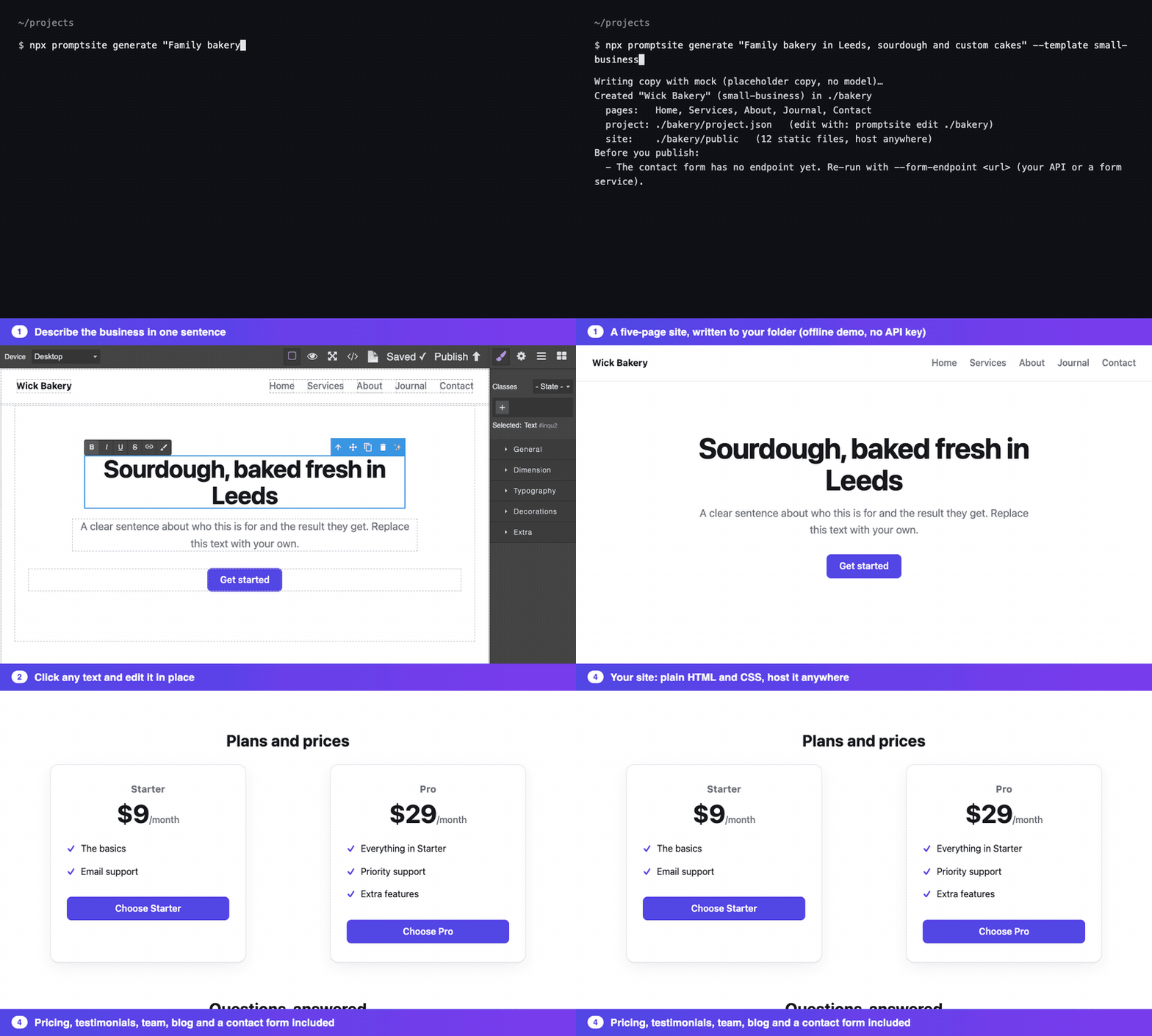
A real recording of the CLI and editor, using the offline --provider mock so no API key is needed. Or try the editor in your browser.
Two packages
The project ships as two npm packages that work together. Pick by what you want to do:
| Package | Use it to | Start |
|---|---|---|
grapesjs-advance-components | Embed an editor with 41 accessible blocks, forms that submit, Stripe checkout, page export and bring-your-own-model AI in your own app. Browser only. | npm i grapesjs grapesjs-advance-components |
promptsite | Generate a finished multi-page site from one sentence, edit it visually, audit it for leaks, or run an HTTP API for n8n and CI. Node only. | npx promptsite generate "…" |
promptsite is built on the plugin. The plugin never depends on it, so if you only embed the editor you carry no CLI or server code.
Can I rely on it?
It is a small, single-maintainer project, so here is what is checked instead of asking you to trust it.
- Tested across versions. Every change runs the plugin tests on Node 18, 20 and 22 against GrapesJS 0.21, 0.22 and the latest release, and the CLI tests on Node 18, 20 and 22.
- Releases are traceable. Both packages are published from GitHub Actions with npm provenance and no long-lived npm token.
- Leaks are blocked, not just reported.
promptsite audit, andpromptsite deploywhich runs it first, fail on committed API keys and unsafe markup. Credentials come from the environment and are never accepted as flags. - No runtime dependencies in the plugin;
grapesjsis a peer dependency, so you never get a second copy of it. - Honest limits. Generated copy is a draft, and
promptsite deployis tested with a fake runner but not yet against a live Cloudflare or Netlify account. The docs say so where it applies.
How it fits with other GrapesJS plugins
It is meant to sit beside them, not replace them.
| You need | Use |
|---|---|
| Layout columns, basic text, link, image, video | grapesjs-blocks-basic |
| A full editor UI preset | grapesjs-preset-webpage |
| Paste raw HTML or script into a block | grapesjs-custom-code |
| Finished marketing sections, forms that post to your endpoint, Stripe checkout, tabs, and a way to build your own tested blocks | this plugin |
| A whole site from a prompt, audited and deployable | promptsite |
Generate a whole site from a prompt
The promptsite command line tool writes a multi-page site from one sentence, lets a person polish it in the visual editor, and exports plain static files you can host anywhere. There is nothing to install first: npx fetches it (Node 18 or newer).
export ANTHROPIC_API_KEY=sk-ant-...        # your own key; read from the environment, never stored

npx promptsite generate "Family bakery in Leeds, sourdough and custom cakes, order online" \
  --template local-business --accent "#b45309" --form-endpoint https://api.example.com/contact \
  --out ./bakery

npx promptsite edit ./bakery        # visual editor on http://127.0.0.1:4173 (autosaves; Publish writes ./bakery/public)
No key yet? --provider mock writes placeholder copy so you can try the whole pipeline offline.
What you get
bakery/
  project.json     the editable GrapesJS project (open it with `promptsite edit`, load it in your own editor)
  promptsite.json         your settings (template, brand colour, form endpoint, payment link)
public/ index.html, about.html, contact.html + .css + .js: static, no framework, CSP-friendly| Template | Pages | For |
|---|---|---|
landing | Home, Pricing, Contact | SaaS or product: hero, benefits, testimonials, FAQ, plans |
local-business | Home, About, Contact | Shop, studio or service: hero, services, about, testimonials |
small-business | Home, Services, About, Journal, Contact | A full small-business site: testimonials, services with plans and FAQ, the team, a blog list |
shop | Home, Contact | Products or plans with Stripe buttons, FAQ and a newsletter signup |
How it works
- The model writes copy, not markup. It returns JSON (headline, features, FAQ, plans…) that is validated and bounded. An unusable reply is retried once with the problem explained.
- Templates build the pages from this package's own blocks (hero, features, FAQ, pricing, form). Every model string is escaped by the tool, so the output is safe by construction and fully editable afterwards.
- You review in the editor.
promptsite editopens the project with the ✨ button wired to the same model through the local server, so your key never reaches the browser. - Export is deterministic.
promptsite buildre-rendersproject.jsontopublic/, so CI can rebuild the site from the committed project.
Options
| Flag | |
|---|---|
--template | landing (default), local-business, small-business or shop |
--name, --accent #hex, --theme light|dark | Business name, brand colour (hover and focus shades are derived), dark pages |
--payment-link | A Stripe Payment Link. Pricing buttons become checkout buttons; without it they lead to the contact page. |
--form-endpoint | Where the contact and newsletter forms post. Without it they show a "no valid endpoint" message. |
--provider | anthropic (default, uses ANTHROPIC_API_KEY), endpoint (your own backend via --endpoint, same contract as createFetchGenerator) or mock |
--model | Model id (default claude-sonnet-5-5, or PROMPTSITE_MODEL) |
--port, --force | edit port (default 4173); overwrite an existing project |
The local editor is locked down
promptsite edit can write files and spend your API key, so it binds to 127.0.0.1 only, rejects any request whose Host or Origin is not itself (blocking DNS-rebinding and cross-site requests from other tabs), requires JSON bodies, and only publishes files named [a-z0-9-].html|css|js into public/. These rules are covered by tests.
public/ is plain files for any static host). The first run installs jsdom and grapesjs as dependencies, because the site is rendered in a headless editor.What can you build with it?
This package is for teams that want users or staff to build web pages inside their own product. It extends GrapesJS, so your app embeds the editor and you decide where the pages are stored and published. Six scenarios:
1. Customer-built pages in a SaaS
Who: booking tools, course platforms, link-in-bio and community products.
How: embed the editor in your dashboard, save each customer's project JSON, publish the export on their subdomain.
Uses: blocks, theming, multi-page, export.
2. Agency site-delivery pipeline
Who: freelancers and agencies selling "your site in an hour".
How: intake form → promptsite generate drafts the pages → a person polishes them in promptsite edit → deploy public/.
Uses: the site generator, forms, Stripe links.
3. Internal campaign pages
Who: marketing teams that wait on developers for every landing page.
How: a private editor with your brand's blocks and colours; staff can't break the design system.
Uses: blocks, --aac-* theming, hide blocks you don't want.
4. Sell from a page
Who: creators and founders with a product and no checkout backend.
How: a pricing card whose button opens a Stripe Payment Link.
Uses: Pricing and Checkout blocks (see Stripe checkout).
5. Programmatic pages
Who: products that need one page per city, store or listing.
How: generate each project from data (and optionally AI copy), render on the server, publish static files.
Uses: headless render recipe below.
6. FAQ and help pages
Who: support teams that want an editable help centre without a CMS.
How: the accessible FAQ accordion, headings and links, exported as static pages.
Uses: FAQ block, multi-page.
Example: agency delivery pipeline
# 1. from the client's intake answers
npx promptsite generate "$BRIEF" --template local-business --name "$CLIENT" --accent "$BRAND" \
  --form-endpoint "https://api.youragency.com/leads/$CLIENT" --out "sites/$CLIENT"

# 2. a person reviews and edits
npx promptsite edit "sites/$CLIENT"

# 3. rebuild from the committed project in CI, then deploy the static files
npx promptsite build "sites/$CLIENT" && npx promptsite deploy "sites/$CLIENT" --to netlify --project "$SITE_ID" --prod   # see Deploy
Install
npm i grapesjs grapesjs-advance-componentsgrapesjs (≥ 0.21) is a peer dependency: the plugin uses the editor you give it and never bundles its own copy. It is tested against 0.21, 0.22 and 0.23.
From a CDN (registers itself as grapesjs-advance-components):
<script src="https://unpkg.com/grapesjs"></script>
<script src="https://unpkg.com/grapesjs-advance-components"></script>
<script>
  grapesjs.init({ container: '#gjs', plugins: ['grapesjs-advance-components'] });
</script>
Quick start
import grapesjs from 'grapesjs';
import advanceComponents from 'grapesjs-advance-components';

grapesjs.init({
  container: '#gjs',
  plugins: [advanceComponents],
  pluginsOpts: {
    [advanceComponents]: {
      // every key is optional; see Options below
    },
  },
});
One call: createEditor
If you would rather not write grapesjs.init, createEditor sets the plugin up and passes everything else straight to GrapesJS:
import 'grapesjs/dist/css/grapes.min.css';
import { createEditor } from 'grapesjs-advance-components/editor';

const editor = createEditor({
  container: '#editor',                 // selector or element
  plugin: { custom: [testimonial] },    // options for this plugin
  projectData,                          // optional: a saved project
  storageKey: 'my-site',                // autosaves in this browser
  onReady: (editor) => {},
});| Option | Default | Description |
|---|---|---|
container | required | Where to mount the editor. |
plugin | {} | This plugin's options. |
plugins | [] | Other GrapesJS plugins to load first. |
projectData | none | A project from editor.getProjectData(). |
storage | 'local' | 'local' autosaves in localStorage; false turns storage off; or pass a GrapesJS storageManager for your own backend. |
storageKey | 'aac-project' | The localStorage key for storage: 'local'. |
onReady | none | Called with the editor once GrapesJS has loaded. |
Every other option is a normal GrapesJS option (height defaults to 100vh). It lives in its own entry, grapesjs-advance-components/editor, because it imports grapesjs; the main entry does not, so pages that load GrapesJS from a <script> tag are unaffected. It is not part of the browser (<script>) build.
Integration guides
The plugin only needs a GrapesJS editor, so it works in any framework. The rules are the same everywhere: create the editor in the browser only, and destroy it when the component goes away.
React
GrapesJS also publishes an official wrapper, @grapesjs/react. The plain pattern below has no extra dependency.
import { useEffect, useRef } from 'react';
import grapesjs from 'grapesjs';
import 'grapesjs/dist/css/grapes.min.css';
import advanceComponents, { createFetchGenerator } from 'grapesjs-advance-components';

export function Builder({ project, onChange }) {
  const el = useRef(null);

  useEffect(() => {
    const editor = grapesjs.init({
      container: el.current,
      height: '100vh',
      storageManager: false,              // you own persistence, see "Saving and loading"
      projectData: project,
      plugins: [advanceComponents],
      pluginsOpts: { [advanceComponents]: { ai: { generate: createFetchGenerator('/api/ai') } } },
    });
    editor.on('update', () => onChange(editor.getProjectData()));   // debounce this in real apps
    return () => editor.destroy();       // also makes React StrictMode's double mount safe
  }, []);

  return <div ref={el} />;
}
Next.js
GrapesJS touches window and document, so it must not render on the server (otherwise: window is not defined). Mark the component as a client component and load it with SSR switched off:
// app/builder/page.jsx
'use client';
import dynamic from 'next/dynamic';
const Builder = dynamic(() => import('../../components/Builder'), { ssr: false });
export default function Page() { return <Builder />; }
Your two API routes keep secrets on the server. The AI route is the same idea as examples/ai-server.mjs. A Stripe Checkout Session route:
// app/api/checkout/route.js: creates a Checkout Session and returns its hosted-page URL
const PRICES = new Set(process.env.ALLOWED_PRICE_IDS.split(','));   // never trust a client-sent price blindly

export async function POST(req) {
  const { priceId, quantity = 1 } = await req.json();
  if (!PRICES.has(priceId)) return Response.json({ error: 'unknown price' }, { status: 400 });

  const body = new URLSearchParams({
    mode: 'payment',
    'line_items[0][price]': priceId,
    'line_items[0][quantity]': String(Math.min(Math.max(Number(quantity) || 1, 1), 10)),
    success_url: `${process.env.SITE_URL}/thanks`,
    cancel_url: `${process.env.SITE_URL}/pricing`,
  });
  const res = await fetch('https://api.stripe.com/v1/checkout/sessions', {
    method: 'POST',
    headers: { Authorization: `Bearer ${process.env.STRIPE_SECRET_KEY}`, 'Content-Type': 'application/x-www-form-urlencoded' },
    body,
  });
  const session = await res.json();
  if (!res.ok) return Response.json({ error: 'checkout failed' }, { status: 502 });
  return Response.json({ url: session.url });   // the button redirects here (checkout.stripe.com is allowlisted)
}/thanks.Vue 3
<script setup>
import { onMounted, onBeforeUnmount, ref } from 'vue';
import grapesjs from 'grapesjs';
import 'grapesjs/dist/css/grapes.min.css';
import advanceComponents from 'grapesjs-advance-components';

const el = ref(null);
let editor;
onMounted(() => { editor = grapesjs.init({ container: el.value, height: '100vh', storageManager: false, plugins: [advanceComponents] }); });
onBeforeUnmount(() => editor?.destroy());
</script>
<template><div ref="el" /></template>
With Nuxt, wrap the component in <ClientOnly>.
Saving and loading
Pages, styles and assets live in the standard GrapesJS project data, so any storage manager persists them. Remote storage to your own API:
storageManager: {
  type: 'remote',
  autosave: true,
  stepsBeforeSave: 5,                         // batch saves instead of one request per edit
  options: { remote: {
    urlStore: `/api/projects/${id}`,
    urlLoad:  `/api/projects/${id}`,
    fetchOptions: (opts) => (opts.method === 'POST' ? { method: 'PUT' } : {}),
    onStore: (data) => ({ data }),            // body sent to your API
    onLoad: (result) => result.data,          // project JSON back into the editor
  } },
}
Server-side rendering of saved projects
A common question is how to turn stored project JSON into HTML on the server, without a browser or editor UI. GrapesJS has a headless mode, and the export helpers run in it. examples/render-site.mjs renders a project to a folder of static files. (For projects generated with promptsite, promptsite build <dir> does this for you.)
npm i grapesjs grapesjs-advance-components jsdom
node examples/render-site.mjs project.json ./out      # writes index.html, pricing.html, *.css, *.js
Node has no DOM, so the script gives it one with jsdom before importing GrapesJS. This was run end to end from a packed install in a clean directory.
Publishing under a strict Content-Security-Policy
By default each exported page carries an inline <style> and <script>. If your site forbids inline code, export external files instead:
exportSiteFiles(editor, { assets: 'external' });
// { 'index.html', 'index.css', 'index.js', 'pricing.html', … }, linked with <link> and <script src defer>
This covers published pages. It does not change how the editor itself runs; see the CSP note under Problems.
Publishing the files
The package produces files; it does not host them. exportSiteFiles() returns a plain { path: content } map you can zip (createZip), upload to object storage, commit to a repo, or hand to a static host's upload API.
Options
| Option | Default | Description |
|---|---|---|
components | built-in list | Add, replace (by name) or hide (visible: false) blocks. |
injectStyles | true | Inject the base stylesheet. Set false to ship your own CSS for the .aac-* classes. |
i18n | {} | Extra messages per locale, merged over the English defaults. |
ai | off | { generate } enables AI block generation. See AI generation. |
payments | {} | { allowedHosts } for the checkout button. See Stripe checkout. |
custom | [] | Your own components made with defineComponent. See Build your own component. |
pages | true | false disables the page manager; { panel: false } hides the panel button only. |
pluginsOpts: {
  [advanceComponents]: {
    components: [
      { label: 'Faq', name: 'faq', componentType: 'faq', visible: false },        // hide a default
      { label: 'Email', name: 'email', category: 'Form', componentType: 'inputElement',
        formElement: { type: 'email', name: 'email', label: 'Email', placeholder: 'you@example.com' } },
    ],
  },
}
Block reference
| Block | Block id | componentType |
|---|---|---|
FAQ accordion (native <details>) | faq-block | faq |
| Heading h1–h6 | heading-h1-block … heading-h6-block | heading |
| Paragraph | paragraph-block | paragraph |
| Quote | quote-block | quote |
| List | list-block | list |
| Link | link-block | link |
| Button | button-block | button |
| Divider | divider-block | divider |
| Progress bar | progress-bar-block | progress-bar |
| Slider (CSS scroll-snap) | slider-block | slider |
| Header / Footer | header-block, footer-block | header, footer |
| Map, Image, Video | map-block, image-block, video-block | map, image, video |
| Input, checkbox, radio | input-element-<type>-block | inputElement |
| Select / Textarea | dropdown-block, textarea-block | dropdown, textarea |
| Hero, Features, Call to action | hero-block, features-block, cta-block | hero, features, cta |
| Contact form, Newsletter | form-block, newsletter-block | form, newsletter |
| Checkout button | checkout-button-block | checkout |
| Pricing card | pricing-block | pricing |
| Testimonials | testimonials-block | testimonials |
| Logo wall | logos-block | logos |
| Team | team-block | team |
| Blog list | blog-block | blog |
| Stats | stats-block | stats |
| Steps | steps-block | steps |
| Banner | banner-block | banner |
| Comparison table | compare-block | compare |
| Tabs | tabs-block | tabs |
Blocks use inline SVG icons, so no icon font is needed. Form fields get unique ids and matching label for; option values and placeholders are escaped.
Section blocks
Pricing, testimonials, the logo wall, team and blog list are made with defineComponent, the same API you use for your own. Their source is src/sections.ts, and it is a good starting point to copy. Each is one section whose list items you can add, copy, remove and reorder in the editor (repeat) while the rest of the section stays fixed (locked), and whose text is edited in place (editable). Settings live in the markup, so they survive export and re-import.
| Block | Settings | List items |
|---|---|---|
| Testimonials | Columns (1, 2 or 3) | Quote cards |
| Logo wall | Muted colours | Logos (text wordmarks; replace with images if you like) |
| Team | Columns (1, 2 or 3) | People: initials, name, role |
| Blog list | Layout (list or grid) | Posts: date line, title, excerpt |
| Pricing | Price, period; the button is a checkout button | Feature lines |
| Stats | Columns (2, 3 or 4) | Value and label pairs |
| Steps | Layout (vertical or horizontal); numbered by CSS | Steps |
| Banner | Tone (info, success or warning) | One editable line, announced as a note |
| Comparison table | Striped rows | Table rows; real header cells with scope |
| Tabs | none; three fixed tabs | Without JavaScript every panel is shown, so nothing is hidden. With it: tab roles, arrow keys, Home and End. |
The columns collapse to one on narrow screens. The blog list shows a date line you fill in yourself, because the templates never invent facts. The checkoutElement option still sets the pricing button's mode, URL and text.
Theming
The blocks look finished with no setup, and every colour and the corner radius read a CSS custom property, so one line re-skins them. Try it live in the block showcase (light, dark and a teal re-skin).
:root { --aac-accent: #0d9488; --aac-radius: 4px; }          /* re-skin */
<body data-aac-theme="dark"> /* dark pages: any ancestor works */| Token | Default | Controls |
|---|---|---|
--aac-accent | #4f46e5 | Buttons, links on hover, check marks, progress fill, focus colour |
--aac-accent-hover | #4338ca | Button hover |
--aac-accent-fg | #ffffff | Text on accent backgrounds |
--aac-fg | inherits the page | Block text colour |
--aac-muted | #71717a | Secondary text (FAQ answers, captions, nav) |
--aac-border | #e4e4e7 | Card, field and divider borders |
--aac-bg | #fafafa | Soft surfaces (slider, hover) |
--aac-surface | #ffffff | Cards, fields, header |
--aac-track | #e4e4e7 | Progress bar track |
--aac-ring | indigo, 35% | Keyboard focus ring |
--aac-radius, --aac-radius-lg | 8px, 14px | Corner radius for controls and for cards |
--aac-shadow | soft two-layer | Pricing card shadow |
What is built in
- States: hover, active and visible keyboard focus on buttons, form fields and FAQ rows.
- Responsive: the header and footer wrap, the slider and pricing card tighten below 640px.
- Motion: transitions switch off under
prefers-reduced-motion. - Variants: add the class
aac-button--outlineto a button for the outline style. - Typography is yours. Blocks inherit your page's font. They do not set a font family.
The stylesheet is also exported (import { baseCss } from 'grapesjs-advance-components') if you want to extend it, and injectStyles: false turns it off entirely.
background: var(…) or border-color: var(…), so custom properties only appear in longhand properties. And it keeps only the last rule for a selector, so each selector is declared exactly once. If you add your own rules through editor.Css, the same two rules apply.Progress bar
A real component (aac-progress-bar, made with defineComponent) with percentage (0–100, clamped) and color traits. The bar uses your --aac-accent until you pick a colour. State lives in the inner element's style and aria-valuenow stays in sync, so exported HTML needs no script. Saved HTML is recognised again when loaded.
AI block generation
Describe what you want ("pricing FAQ for a project-management SaaS") and it lands on the canvas as editable components, inserted below the selection or replacing it. Undo works as usual. You provide the model call, so there is no vendor lock-in and no API key in the browser.
1. Through your backend
import advanceComponents, { createFetchGenerator } from 'grapesjs-advance-components';

pluginsOpts: {
  [advanceComponents]: {
    ai: { generate: createFetchGenerator('/api/ai') },
  },
}
createFetchGenerator POSTs { prompt, system, mode, currentHtml } and expects { "html": "…" }. examples/ai-server.mjs is a ~60-line server that forwards to the Anthropic Messages API.
2. Any function
ai: {
  generate: async ({ prompt, system, mode, currentHtml, signal }) => {
    return await myBackend.complete({ system, prompt, currentHtml, signal }); // string or { html }
  },
}
ai option | Default | |
|---|---|---|
generate | required | (req) => Promise<string | { html }> |
sanitize | built-in allowlist | Replace the sanitizer. Must return HTML that is safe to render and export. |
system | built-in prompt | System prompt sent with each request. |
toolbar | true | ✨ button on the toolbar of selected components. |
commandId | aac:ai-generate | |
timeoutMs | 60000 | Aborts via req.signal and rejects. |
editor.runCommand('aac:ai-generate');                                  // opens the dialog
await editor.runCommand('aac:ai-generate', { prompt: 'Hero for a coffee shop' });
await editor.runCommand('aac:ai-generate', { prompt: 'Make it shorter', mode: 'replace' });
editor.on('aac:ai:generated', ({ prompt, mode, components }) => {});
Stripe checkout
The Checkout and Pricing blocks add a button that sends the visitor to a Stripe-hosted page. Card details never touch your page or this package, and no secret key is ever involved.
| Mode | How it works |
|---|---|
link | Redirects to a Payment Link (https://buy.stripe.com/…). No backend needed. |
session | POSTs { priceId, quantity } to your endpoint, which creates a Checkout Session with your secret key and returns { url }. |
components: [
  { label: 'Buy', name: 'checkout', category: 'Commerce', componentType: 'checkout',
    checkoutElement: { mode: 'link', url: 'https://buy.stripe.com/xxxx', buttonText: 'Buy now' } },
]
payments: { allowedHosts: ['checkout.stripe.com', 'buy.stripe.com'] }   // default
Safety and hooks
- Redirects only go to
httpshosts inallowedHosts; anything else is blocked and reported (https://buy.stripe.com.evil.comis rejected). Add your host if you use a custom Checkout domain. - The button is inert inside the editor canvas.
- Its settings are
data-mode,data-url,data-endpoint,data-price-idanddata-quantityon the<button>, so a saved or generated page keeps them without any extra state. The allow-list is embedded in the script. - Cancelable events bubble from the button:
aac:checkout(detail.url; callpreventDefault()to take over the redirect or send analytics) andaac:checkout-error(detail.message). - While a session request is in flight the button has
aria-busy="true"; errors show throughdata-error.
Forms that submit
The Contact form and Newsletter blocks post to your endpoint, or to a form service such as Formspree or Netlify Forms. Set the endpoint in the trait panel, or in the plugin options:
components: [
  { label: 'Contact', name: 'form', category: 'Form', componentType: 'form',
    formAction: { endpoint: 'https://api.example.com/contact', encoding: 'json',
                  successMessage: 'Thanks, we will reply soon.', redirectUrl: '/thanks.html' } },
]| Behaviour | Detail |
|---|---|
| Validation | Uses the browser's built-in validation (required, type="email"); nothing is sent until the form is valid. |
| Sending | fetch POST of JSON (default) or form-encoded data (encoding: 'form', which form services expect). File uploads are not supported. |
| States | An aria-live status line shows sending, success and error. Values are kept when sending fails and cleared on success. |
| Bots | A hidden honeypot field (_gotcha). If a bot fills it, the form looks successful and sends nothing. It is a first line of defence only. |
| Where settings live | On the <form> as action, data-encoding, data-success-message, data-error-message and data-redirect-url, so exported and re-imported HTML keeps them. |
| No JavaScript | The form still has method="post" and your action, so it falls back to a normal browser POST. |
| Safety | Endpoints must be https (or http on localhost). An empty, javascript: or plain-http endpoint is refused with a visible message. |
Events
Cancelable and bubbling, on the form element of the published page:
form.addEventListener('aac:form-submit', (e) => {
  e.preventDefault();                       // take over sending (your own API client, analytics, CAPTCHA token…)
  myApi.send(e.detail.data);                // { name, email, message }
});
form.addEventListener('aac:form-success', (e) => track('lead', e.detail.data));
form.addEventListener('aac:form-error',   (e) => console.warn(e.detail.message));
A backend in a few lines
// Next.js: app/api/contact/route.js
export async function POST(req) {
  const { name, email, message } = await req.json();
  if (!name || !/^\S+@\S+\.\S+$/.test(email) || !message) return Response.json({ error: 'invalid' }, { status: 400 });
  await sendEmail({ to: process.env.INBOX, replyTo: email, subject: `Message from ${name}`, text: message });
  return Response.json({ ok: true });
}Multi-page sites
GrapesJS has a native Pages API, and the plugin builds on it. A Pages button (📄) in the options panel opens a manager to add, rename, switch and delete pages and to download the whole site.
editor.runCommand('aac:pages');          // open the manager
editor.runCommand('aac:download-site');  // site.zip with one HTML file per page
Linking between pages
Set a link's href to page:<slug> (the slug of the page name, e.g. page:about-us). It is rewritten to about-us.html on export. The first page is always index.html.
Export from code
import { exportSite, exportSiteFiles, createZip } from 'grapesjs-advance-components';

const pages = exportSite(editor, { lang: 'en', siteName: 'Acme', description: 'What Acme does', head: '<link rel="icon" href="/f.ico">' });
// [{ id, name, file: 'index.html', html, css, js, document }, ...]   (js = component scripts, e.g. checkout)

const files = exportSiteFiles(editor);     // { 'index.html': '...', 'about.html': '...' }
const safe  = exportSiteFiles(editor, { assets: 'external', securityHeaders: true });   // + .css/.js and a strict-CSP _headers file
const zip = createZip(files);              // Uint8Array, no dependencies
Component scripts (such as the checkout button's) are included in every export, inline by default or as .js files with assets: 'external' (see strict CSP). Pass siteName and description to get proper <title> tags (About · Acme) and a meta description on every page. Page names are escaped in the title, and duplicate file names get a numeric suffix. Pages are stored in the normal GrapesJS project data, so any storage manager persists them.
Automation: n8n, CI and any workflow tool
Everything the CLI does is also available as a small HTTP API, so n8n, Zapier, Make or a cron job can generate, build and audit sites without a human at a terminal.
export ANTHROPIC_API_KEY=...                       # stays on this machine
export PROMPTSITE_API_TOKEN="$(openssl rand -hex 24)"     # 24+ characters, required
npx promptsite serve --root ./sites --port 8787 # http://127.0.0.1:8787| Request | Does |
|---|---|
GET /health | Liveness, no token needed. |
POST /v1/generate | { slug, brief, template?, name?, accent?, theme?, formEndpoint?, paymentLink?, force? } writes sites/<slug>/ and returns pages, files and scanner notes. |
POST /v1/build | { slug } re-renders project.json to public/. |
POST /v1/audit | { slug } returns { passed, summary, findings }. |
GET /v1/sites | Lists generated sites. |
GET /v1/sites/<slug>/bundle.zip | The public/ folder as a zip, ready for a deploy step. |
Every call except /health needs Authorization: Bearer $PROMPTSITE_API_TOKEN.
n8n
examples/n8n/site-intake.workflow.json is an importable workflow: webhook → generate → audit → respond. The token lives in an n8n Header Auth credential, never in the workflow file, and the webhook has its own header credential. The README next to it has the five setup steps.
CI
# .github/workflows/site.yml
- run: npx promptsite build ./site                  # re-render from the committed project.json
- run: npx promptsite audit ./site --strict         # fails the build on a leak or unsafe markup
- run: npx promptsite deploy ./site --to cloudflare --project my-site --branch main   # audits again, then uploads (see Deploy)
promptsite audit exits non-zero when it finds a high-severity problem (or a medium one with --strict) and supports --json for scripts. It scans public/, project.json and promptsite.json, or any folder you point it at.
Deploy to Cloudflare Pages or Netlify
promptsite deploy audits the site, then hands the folder to the host's own command line tool. It does not talk to Cloudflare or Netlify itself and it keeps no credentials, so it can only do what your token already allows.
# Cloudflare Pages
export CLOUDFLARE_API_TOKEN=...  CLOUDFLARE_ACCOUNT_ID=...
npx promptsite deploy ./site --to cloudflare --project my-site --branch main

# Netlify (a draft URL unless you add --prod)
export NETLIFY_AUTH_TOKEN=...
npx promptsite deploy ./site --to netlify --project <site-id> --prod

# See exactly what would run, deploy nothing
npx promptsite deploy ./site --to cloudflare --project my-site --dry-run| Step | What happens |
|---|---|
| 1. Find the files | Uploads <dir>/public for a generated site, or the folder itself if it holds an index.html. |
| 2. Audit | The same scan as promptsite audit, over public/, project.json and promptsite.json. A high-severity finding (a leaked key, say) stops the deploy before anything is uploaded. --strict also stops on medium findings. |
| 3. Credentials | Read from the environment. If one is missing you get its name, never a value. --dry-run shows which are set. |
| 4. Upload | Runs wrangler@4 pages deploy or netlify-cli@27 deploy with npx, with no shell, so nothing in your arguments is interpreted. Their output is shown as it comes. |
| Option | Cloudflare Pages | Netlify |
|---|---|---|
--project | The Pages project name (or CLOUDFLARE_PAGES_PROJECT). Create the project once in the dashboard or with wrangler pages project create. | The site ID (or NETLIFY_SITE_ID), under Site configuration. |
| Live or preview | --branch <name>: the project's production branch goes live, any other branch is a preview. | A draft URL by default; --prod makes it live. |
| Credentials | CLOUDFLARE_API_TOKEN (an API token that can edit Pages) and CLOUDFLARE_ACCOUNT_ID | NETLIFY_AUTH_TOKEN (a personal access token) |
Safety
- Tokens are never flags.
--token,--authand similar are refused, because a token on the command line lands in shell history and process lists. The Netlify site ID is passed to the Netlify tool through its environment, and yourANTHROPIC_API_KEYandPROMPTSITE_API_TOKENare removed from the environment the host's tool gets. - Use a token scoped to one project. A Cloudflare token limited to Pages and one account, and a Netlify token you can revoke, cap what a mistake can do.
- Node 22 or newer. Both host tools need it, even though the rest of
promptsiteruns on 18. You get a clear message instead of a crash from the host. - The first run downloads the host's tool with
npx. It is pinned to a major version (wrangler@4,netlify-cli@27), so a new major release cannot change how your deploy behaves.
wrangler@4 pages deploy --help and netlify-cli@27 deploy --help. It has not been run against a real Cloudflare or Netlify account by the author. Try it once with --dry-run, then on a throwaway project, before you rely on it.Try it safely first
- Make a throwaway site:
npx promptsite generate "Test bakery" --template small-business --provider mock --out ./throwaway-site. - Dry run:
npx promptsite deploy ./throwaway-site --to cloudflare --project throwaway-site --branch preview --dry-run. It shows the audit result, the exact command, and which credentials are set. It exits with an error until they are set, and deploys nothing. - Get credentials, for a throwaway project.
- Cloudflare: create the Pages project once (dashboard: Workers & Pages, Create, Pages, Upload assets; or
npx wrangler pages project create throwaway-site --production-branch main). Create an API token (My Profile, API Tokens, Custom) with Account, Cloudflare Pages, Edit on your account only. Your account ID is on the Workers & Pages overview. - Netlify: create a site by dropping any folder under Add new site, Deploy manually, and copy its Site ID from Site configuration. Create a personal access token under User settings, Applications.
export. Never put a token in a command's arguments, in a file you commit, or in a chat. - Cloudflare: create the Pages project once (dashboard: Workers & Pages, Create, Pages, Upload assets; or
- Deploy a preview:
--branch previewon Cloudflare, or no--prodon Netlify. Open the URL the host prints. - Clean up:
unset CLOUDFLARE_API_TOKEN CLOUDFLARE_ACCOUNT_ID NETLIFY_AUTH_TOKEN, delete the throwaway project or site, and revoke the token.
| If you see | It means |
|---|---|
needs Node 22 or newer | Switch Node first. The rest of promptsite runs on 18, but wrangler and the Netlify tool do not. |
Deploy stopped: N blocking finding(s) | The audit found something such as a leaked key. Run promptsite audit <dir> for the file and line. |
Set CLOUDFLARE_ACCOUNT_ID (or another name) | That variable is empty or missing in the shell you ran it from. |
| Cloudflare "Authentication error" (code 10000) | The token lacks Cloudflare Pages Edit, or belongs to a different account. |
| Project not found | --project must match the Pages project name exactly, and the project must already exist. |
--token is not accepted | By design. Use the environment variables. |
In CI (GitHub Actions)
# .github/workflows/site.yml
on: { push: { branches: [main] } }
jobs:
  deploy:
    runs-on: ubuntu-latest
    steps:
      - uses: actions/checkout@v4
      - uses: actions/setup-node@v4
        with: { node-version: 22 }
      - run: npx promptsite build ./site        # re-render from the committed project.json
      - run: npx promptsite deploy ./site --to cloudflare --project my-site --branch main --strict
        env:
          CLOUDFLARE_API_TOKEN: ${{ secrets.CLOUDFLARE_API_TOKEN }}
          CLOUDFLARE_ACCOUNT_ID: ${{ secrets.CLOUDFLARE_ACCOUNT_ID }}
      # or Netlify:
      # - run: npx promptsite deploy ./site --to netlify --project ${{ vars.NETLIFY_SITE_ID }} --prod --strict
      #   env: { NETLIFY_AUTH_TOKEN: "${{ secrets.NETLIFY_AUTH_TOKEN }}" }
Store the tokens as repository secrets. For a pull request, drop --branch main (Cloudflare) or --prod (Netlify) to get a preview URL instead of a live deploy.
From n8n or another workflow tool
The HTTP API makes the site; the deploy step is a command. In n8n, add an Execute Command node after the generate step (it needs n8n to run on a machine with Node 22 and the token variables in its environment):
npx promptsite deploy /data/sites/{{ $json.slug }} --to netlify --project {{ $env.NETLIFY_SITE_ID }} --prodThe API itself has no deploy endpoint on purpose: a network service that holds your hosting token would be a much bigger target than a command you run where the token already lives. The n8n workflow in the repository does not include this step, and I have not run it in a live n8n.
Build your own component
defineComponent turns a piece of HTML into a GrapesJS component with a block, settings in the trait panel, CSS and an optional runtime script. It is the same API the Progress bar, Quote, Hero and Checkout blocks are built with. The HTML is the source of truth: every setting lives in the markup, so it survives export, re-import and promptsite build with no extra work.
1. A static block
import { defineComponent } from 'grapesjs-advance-components';

export const testimonial = defineComponent({
  id: 'acme-testimonial',            // unique type id: prefix it
  label: 'Testimonial',
  category: 'Social proof',
  icon: '💬',                    // SVG markup, or a short text such as an emoji
  html: `<figure class="acme-testimonial acme-testimonial--round">
    <blockquote>Tell people what changed for you.</blockquote>
    <figcaption>Name, Role</figcaption>
  </figure>`,
  editable: ['blockquote', 'figcaption'],   // double-click to edit these
  css: `.acme-testimonial{margin:24px 0;padding:24px;border-left-width:4px;border-left-style:solid;border-left-color:var(--aac-accent,#4f46e5)}`,
});

grapesjs.init({
  plugins: [advanceComponents],
  pluginsOpts: { [advanceComponents]: { custom: [testimonial] } },
});
That registers the component type, a acme-testimonial-block block and the CSS. The CSS is only exported on pages that use the component. Use one root element; saved HTML is recognised again by the root's first class (change that with detect).
2. Settings (traits)
traits: {
  tone:    { type: 'select', options: ['light', 'dark'], default: 'light',
             bind: { class: { light: 'acme-testimonial--light', dark: 'acme-testimonial--dark' } } },
  rounded: { type: 'checkbox', default: true, bind: { classIf: 'acme-testimonial--round' } },
  accent:  { type: 'color', bind: { cssVar: '--aac-accent' } },
}
For class and classIf the markup decides the starting value: put the class in your html to start with it on.
Without a bind a trait is stored as a data-<name> attribute on the root (priceId becomes data-price-id). A trait can have several binds, for example the Progress bar writes its percentage to both a width and aria-valuenow.
| Bind | Writes | Readable by a page script |
|---|---|---|
{ attr: 'aria-valuenow', on? } | an attribute | yes |
{ text: '.name' } | the text of the matching element | yes |
{ class: { value: 'class-name' }, on? } | one class per option; the others are removed | yes |
{ classIf: 'is-on', on? } | a class when a checkbox is checked | yes |
{ style: 'width', unit?: '%', on? } | an inline style on the element | no |
{ cssVar: '--x', on? } | a custom property in the inline style | no |
on is a selector relative to the root and defaults to the root itself. Trait types are text, number (min, max clamp the value written), select, checkbox and color. Set ui: false to keep a setting out of the panel.
Read and write a setting from code with testimonial.get(component, 'tone') and testimonial.set(component, 'tone', 'dark'). Both are typed by the trait names.
3. A script on the published page
defineComponent({
  id: 'acme-counter',
  label: 'Counter',
  html: '<button type="button" class="acme-counter" data-start="0">0</button>',
  traits: { start: { type: 'number', default: 0 } },
  consts: { max: 10 },                          // JSON values embedded in the script
  script({ el, props, consts, inEditor, emit }) {
    let n = props.start;                        // typed from the traits
    el.addEventListener('click', () => {
      if (inEditor) return;                     // true inside the editor canvas
      n = Math.min(n + 1, consts.max as number);
      el.textContent = String(n);
      emit('acme:count', { n });                // bubbling CustomEvent from el
    });
  },
});
The script is copied into the exported page as text, so it must be self-contained: no imports and no variables from outside the function. Anything it needs goes through props (read from the markup when the page loads) or consts. It does not run in the editor canvas unless you set runInEditor: true. props only holds settings a page can read back; a trait bound only to style or cssVar is left out, and the types reflect that.
4. Controlling editing
| Field | Effect |
|---|---|
editable: ['h1', 'p'] | Those children become rich text. |
locked: true | Children cannot be dragged, removed, copied or dropped into, except editable and repeat parts. |
repeat: ['.faq-item'] | Users can add, copy, remove and reorder these children; their parent only accepts drops of the same kind. |
droppable, removable, copyable | Passed to GrapesJS for the root. |
extend: 'text' | Build on another GrapesJS type. 'text' makes the whole root editable text, as the Quote and Checkout blocks do. |
block: false or { id, label, category } | Skip the block, or rename it. |
def.installBlock(editor, { id, label, category, values, content }) | Add another block from the same definition: a different id, starting values for traits (values) and different HTML inside the root (content). The contact form and newsletter blocks are two blocks of one form definition. |
5. Selectors
Selectors in bind.on, editable and repeat support a small subset, checked when you call defineComponent: a tag, .class, #id, [attr], [attr=value], combinations of those, descendant (space) and child (>). A selector that matches nothing in your HTML is an error with the component id in the message, so typos fail at startup rather than silently.
6. Test it
import { testRoundTrip, verifyScript, assertCss, mountComponent } from 'grapesjs-advance-components/testing';

it('keeps its settings through export and reload', () => testRoundTrip(testimonial, { tone: 'dark' }));
it('has a self-contained script', () => verifyScript(counter));
it('has CSS GrapesJS will keep', () => assertCss(testimonial));
it('works', () => {
  const m = mountComponent(testimonial, { values: { tone: 'dark' } });
  expect(m.html()).toContain('acme-testimonial--dark');
});| Helper | Does |
|---|---|
createTestEditor(setup?, projectData?) | A headless editor, optionally set up by your plugin and loaded with project data. |
mountComponent(def, { values?, editor? }) | Installs the definition and creates one component. Returns get, set, html(), css(), el(). |
runScript(def, el, { inEditor? }) | Runs the exported script on an element, the way the published page does. |
verifyScript(def) | Compiles the script on its own and runs it once; a reference to an outside variable becomes a clear error. |
assertCss(defOrString) | Throws on CSS that GrapesJS would change or drop (see below). |
testRoundTrip(def, values?) | Exports HTML and CSS, loads them into a fresh editor, and checks the type and every setting come back. Also reloads from project JSON. |
Things to know
- One rule per selector. GrapesJS keeps only the last CSS rule for a selector, so
defineComponentreports a selector declared twice incss. - No
var()inside shorthands. GrapesJS's default CSS parser is the browser's, and a shorthand such asbackground,border,margin,padding,gaporwhite-spacethat containsvar(…)comes back as empty longhands, so the value is lost. Longhands such ascolor,background-color,border-left-colorandbox-shadowkeep it.defineComponentchecks about 70 such properties, which I verified in Chrome against GrapesJS 0.22; another browser may differ. The same check runs on the built-in stylesheet. - Unique ids. Installing a different definition under an id that is already registered, or one that clashes with a GrapesJS type, throws instead of overwriting it. Installing the same definition twice is harmless.
- Block overrides. The plugin's
componentsoption can still rename or hide the built-in blocks (visible: false); for your own, useblock.
API & events
| Name | Kind | Purpose |
|---|---|---|
aac:ai-generate | command | Open the AI dialog, or generate with { prompt, mode }. |
aac:pages | command | Open the page manager. |
aac:download-site | command | Download the site as a zip. |
aac:ai:generated | editor event | { prompt, mode, components } after a generation lands. |
aac:checkout, aac:checkout-error | DOM events | From the checkout button, on published pages. |
aac:form-submit, aac:form-success, aac:form-error | DOM events | From form blocks, on published pages. aac:form-submit is cancelable. |
exportSite, exportSiteFiles, downloadSite, createZip, slugify | functions | Site export helpers. |
sanitizeHtml, createFetchGenerator, runAiGeneration, DEFAULT_SYSTEM | functions | AI building blocks. |
scanFiles, assertSafe, redactSecrets, securityHeaders, contentSecurityPolicy | functions | The leak scanner and CSP generator, usable on any folder of static files. |
createEditor | function | Editor with the plugin set up, in one call. Imported from grapesjs-advance-components/editor. See Quick start. |
defineComponent, propKey, DefineComponentError, validateCss, assertCss, queryComponents | functions | The component authoring API. See Build your own component. |
createTestEditor, mountComponent, runScript, verifyScript, assertCss, testRoundTrip | functions | Test helpers, imported from grapesjs-advance-components/testing. |
defaultComponents | const | The built-in block list, for extending. |
Everything is typed; the full option types ship in dist/index.d.ts.
Problems developers report, and where this fits
These come from the GrapesJS issue tracker and community write-ups. Many are limits of GrapesJS itself, which a plugin cannot fix, so the third column says plainly what this package does and does not do.
| Problem | Reference | Status here |
|---|---|---|
Embedding in React, Next.js or Vue; window is not defined on the server | #1970, #3478 | Guides only. Copy-paste patterns above; the plugin adds no framework code. |
| Rendering saved project JSON to HTML on the server | #3399 | Solved with a recipe. The headless editor plus exportSite; tested in plain Node. |
| Managing and exporting multiple pages | #3403 | Provided. Page manager, page:slug links, one-call export. Shared headers and per-page SEO fields are not included yet. |
Elements that share an id across pages get renamed (main-title-2) | #4837 (open) | Not fixed. It is core behaviour. Use classes, not hand-written ids, for anything repeated across pages. |
| Strict CSP blocks inline styles, scripts and the canvas iframe | #6690 (open) | Published pages only. assets: 'external' removes inline code from exports. The editor's own CSP problems are core and remain. |
| Untrusted HTML ending up in the page (XSS) | #5743, #3268 | AI output only. A sanitizer guards what the model returns. It does not sanitize other content you import into the editor. |
| Accessibility of what gets published | #654, #6634 | Blocks only. Semantic markup: <details> FAQ, labelled inputs, ARIA on progress and slider. The editor UI's own accessibility is core. |
| Adding AI to the editor | GrapesJS blog | Lightweight option. See the comparison below. |
| Taking payments from a built page | no single issue; a common ask | Provided via Stripe-hosted pages, not an in-page card form. |
Where it fits next to other options
| You need | Options |
|---|---|
| AI inside the editor | The GrapesJS team offers an AI Chat plugin in the Studio SDK (chat panel, section generation, context kept between sessions). That is a separate product from the open-source core, so check its pricing and licence. This package is a smaller alternative for the open-source core: one generate function, any provider, sanitized output, no chat UI or streaming. |
| A zip of a single page | The official grapesjs-plugin-export does this. This package's zip export covers all pages and has no dependencies. |
| A deploy dashboard | Not included. promptsite deploy publishes to Cloudflare Pages or Netlify from the command line (see Deploy); there is no deploy button in the editor. |
grapesjs-blocks-basic is smaller. This package earns its place when you want accessible blocks plus AI, checkout or multi-page export in one tested bundle.Security
The goal is that secrets cannot end up in generated sites, logs or browsers. No tool can promise zero leaks, so this is layered, fails closed, and is explicit about what it cannot cover.
What is enforced
| Layer | What it does |
|---|---|
| Keys stay in the environment | ANTHROPIC_API_KEY and PROMPTSITE_API_TOKEN are read from env, never from flags, never written to disk, never sent to a browser. The editor's ✨ button calls the model through the local server. |
| Output scanner (fail closed) | Before anything is written, generate, build, the editor's Save and Publish, and the API scan for Anthropic, OpenAI, Stripe secret, GitHub, AWS and Slack keys, private keys, credentials in URLs, secret-looking query parameters, javascript: URLs, inline handlers and plain-http forms. A high-severity finding stops the write (422 over the API) and is shown redacted. --allow <rule> is the explicit opt-out. |
| Log redaction | Errors are stripped of key formats and of the exact values of the keys in use, even if an upstream error echoes one. |
| Strict CSP | Exports include a _headers file (Netlify, Cloudflare Pages): script-src 'self', style-src 'self', no unsafe-inline or unsafe-eval, connect-src limited to your form endpoint. Tested in a browser: the form and checkout still work, and an injected inline script, an inline handler, a third-party script and a request to an unlisted origin are all blocked. |
| Closed-by-default servers | promptsite edit and promptsite serve bind to loopback. serve requires a 24+ character bearer token (constant-time compare), throttles repeated failures, rejects browser requests, caps body size, runs one job at a time with an hourly limit, and confines each site to its own folder. edit rejects any foreign Host or Origin. |
| Untrusted model output | The CLI escapes every model string and never inserts it as HTML. The editor's AI results go through an allowlist sanitizer. Checkout redirects are limited to approved hosts; form endpoints must be https. |
npx promptsite audit ./site            # fail on high severity
npx promptsite audit ./site --strict   # also fail on medium
npx promptsite audit ./site --json     # for scripts
What cannot be promised
- Everything in a static site is public. Form endpoints, Payment Links and publishable keys are visible to every visitor by design. The scanner warns about URLs that look like credentials, but it cannot know that an ordinary-looking URL is secret.
- A webhook URL is a bearer capability. If a public form posts straight to an n8n webhook, anyone can trigger that workflow. Put your own server in between, and keep privileged workflows off public webhooks.
- The scanner is a heuristic. It recognises common token formats, not every possible secret.
- Your brief goes to the model provider. Do not put confidential information in prompts.
- Do not expose
promptsite serveto the internet without TLS and a firewall in front.
Report vulnerabilities privately through GitHub (Security → Report a vulnerability); see SECURITY.md.
Migrating from v1
grapesjsis now a peer dependency; install it yourself.- Block ids are unchanged. The heading entry now registers h1–h6 unless
headingTypeis set. - Entries that never produced a block (
countdown,imageFeature,tab,form,icon) were removed.checkoutnow exists for real. - FAQ, slider, progress bar, divider and form markup moved to
aac-*classes. Pages saved with v1 keep their inline styles. - The browser build is
dist/index.global.js.
Moving from 2.2 to 2.3
- Form settings (endpoint, send-as, messages, redirect) are now
data-*attributes on the<form>, like the checkout button. Forms in saved HTML keep working. A project saved as JSON by 2.2 keeps its endpoint, but loses its custom messages and redirect until you set them again in the trait panel. - Pricing cards wrap the price in
<span class="aac-pricing-amount">. Older cards still render and still check out; their Price field only fills in for the new markup. - The four new blocks are added to the default list. Hide any with
visible: false.
Contributing
One repository, two packages (npm workspaces):
npm install      # links both packages
npm run build    # the plugin first, then the CLI
npm run typecheck
npm test         # both packages
npm run docs     # builds the plugin and copies it into docs/ for local preview of this site
Commit with Conventional Commits (feat = minor, fix = patch, feat! = major). Each package is released on its own: a Release PR per package opens automatically, and merging it tags, creates the GitHub release and publishes to npm with provenance. See RELEASING.md.